Problem
Docker, introduced in 2013, was first on the block in the modern drive for containerization. Podman followed much later in 2019. Which of these two to use is often a dilemma.
Solution
In this article, I compare Podman vs Docker, their similarities and differences, and when to use which. I compare them across various attributes so that you, the user, can make the best choice based on which attributes are most important to you.
Setting the Environment
We need to set up the following environment.
- A Windows machine (Windows 11 is used)
- A Linux machine (Ubuntu 24 is used)
- Create a Docker account to access the Docker Hub public registry
Definition
Podman and Docker are both Open Container Initiative (OCI) – compliant container engines. They are used to provide virtualization via containers. Containerization is a lightweight alternative to isolated virtualization via virtual machines (VMs), which use up a complete Linux kernel per VM.
Native OS Support
Both Podman and Docker are built with native support in the Linux operating system.
Other Supported OS
Both Podman and Docker are supported by Windows and macOS via Linux emulation. Docker is not supported by FreeBSD. Podman has experimental support in FreeBSD. For Solaris, one can run a Linux VM on Solaris and run Docker or Podman in the VM.
Architecture
Podman and Docker both use a similar architecture.
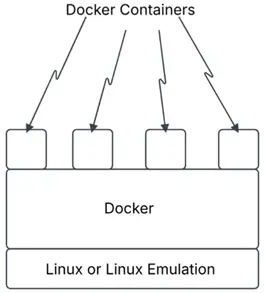
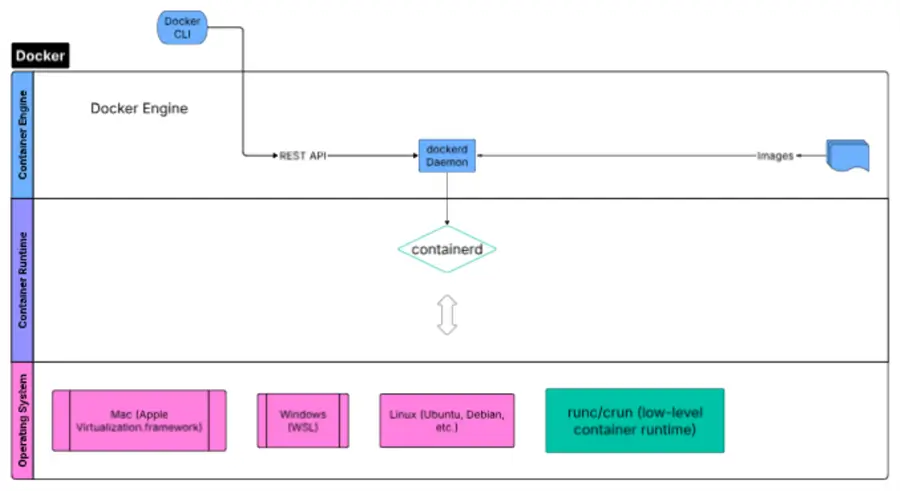
Docker runs on a Linux machine or an operating system (Windows, Mac) that provides a Linux emulation. Docker containers run atop Docker.
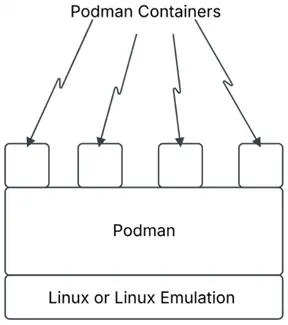
Similarly, Podman runs on a Linux machine or an emulation of Linux. Podman containers run atop Podman.
Images & Containers
Podman and Docker run OCI-compliant containers using OCI-compliant images. We can use the same images available on the Docker Hub for both Podman and Docker.
Founder
Docker was developed by Docker. Podman was developed by Red Hat.
Open Source or Proprietary
The container ecosystem to assemble container-based systems was developed by Docker. Docker made it open source under the Moby project in 2017. The containerd container runtime, as well, was developed by Docker. Docker donated containerd to the Cloud Native Computing Foundation (CNCF) in 2017, making it open source. Both Moby and containerd are licensed under the Apache License 2.0. Docker Desktop is proprietary.
Podman and Podman Desktop are open source.
Installation
Podman is relatively easier to install than Docker.
Install Podman on Ubuntu with two commands.
--MSSQLTips.com (Bash)

sudo apt-get update
sudo apt-get -y install Podman
Run the first Podman container.
--MSSQLTips.com (Bash)
podman run hello-world
Resolved "hello-world" as an alias (/etc/containers/registries.conf.d/shortnames.conf)
Trying to pull quay.io/podman/hello:latest...
Getting image source signatures
Copying blob 81df7ff16254 done   |
Copying config 5dd467fce5 done   |
Writing manifest to image destination
!... Hello Podman World ...!

         .--"--.
       / -     - \
      / (O)   (O) \
   ~~~| -=(,Y,)=- |
    .---. /`  \   |~~
 ~/  o  o \~~~~.----. ~~
  | =(X)= |~  / (O (O) \
   ~~~~~~~  ~| =(Y_)=-  |
  ~~~~    ~~~|   U      |~~

Project:   https://github.com/containers/podman
Website:   https://podman.io
Desktop:   https://podman-desktop.io
Documents: https://docs.podman.io
YouTube:   https://youtube.com/@Podman
X/Twitter: @Podman_io
Mastodon:  @Podman_io@fosstodon.org
Installing Docker requires more commands in comparison.
--MSSQLTips.com (Bash)

# Add Docker's official GPG key:
sudo apt update
sudo apt install ca-certificates curl
sudo install -m 0755 -d /etc/apt/keyrings
sudo curl -fsSL https://download.docker.com/linux/ubuntu/gpg -o /etc/apt/keyrings/docker.asc
sudo chmod a+r /etc/apt/keyrings/docker.asc

# Add the repository to Apt sources:
sudo tee /etc/apt/sources.list.d/docker.sources <<EOF
Types: deb
URIs: https://download.docker.com/linux/ubuntu
Suites: $(. /etc/os-release && echo "${UBUNTU_CODENAME:-$VERSION_CODENAME}")
Components: stable
Architectures: $(dpkg --print-architecture)
Signed-By: /etc/apt/keyrings/docker.asc
EOF

sudo apt update

# Install Docker packages
sudo apt install docker-ce docker-ce-cli containerd.io docker-buildx-plugin docker-compose-plugin
Because Docker makes use of a background service, verify that it is running.
--MSSQLTips.com (Bash)

sudo systemctl status docker
● docker.service - Docker Application Container Engine
     Loaded: loaded (/usr/lib/systemd/system/docker.service; enabled; preset: enabled)
     Active: active (running) since Tue 2026-07-07 22:04:12 UTC; 19s ago
 Invocation: 556118584a5b4bb39865681238ff17e3
TriggeredBy: ● docker.socket
       Docs: https://docs.docker.com
   Main PID: 8432 (dockerd)
      Tasks: 10
     Memory: 28.2M (peak: 28.6M)
        CPU: 761ms
     CGroup: /system.slice/docker.service
             └─8432 /usr/bin/dockerd -H fd:// --containerd=/run/containerd/containerd.sock

Jul 07 22:04:11 ip-10-0-2-199 dockerd[8432]: time="2026-07-07T22:04:11.650942129Z" level=info msg="Restoring containers: start."
Jul 07 22:04:12 ip-10-0-2-199 dockerd[8432]: time="2026-07-07T22:04:12.040906159Z" level=info msg="Loading containers: done."
Jul 07 22:04:12 ip-10-0-2-199 dockerd[8432]: time="2026-07-07T22:04:12.050451313Z" level=info msg="Docker daemon" commit=8ec5ab3 containerd-snapshotter=true storage-driver=overlayfs version=29.6.1
Jul 07 22:04:12 ip-10-0-2-199 dockerd[8432]: time="2026-07-07T22:04:12.050777216Z" level=info msg="Initializing buildkit"
Jul 07 22:04:12 ip-10-0-2-199 dockerd[8432]: time="2026-07-07T22:04:12.510805618Z" level=info msg="Completed buildkit initialization"
Jul 07 22:04:12 ip-10-0-2-199 dockerd[8432]: time="2026-07-07T22:04:12.524882948Z" level=info msg="Daemon has completed initialization"
Jul 07 22:04:12 ip-10-0-2-199 dockerd[8432]: time="2026-07-07T22:04:12.525081205Z" level=info msg="API listen on /run/docker.sock"
Jul 07 22:04:12 ip-10-0-2-199 systemd[1]: Started docker.service - Docker Application Container Engine.
lines 1-23/23 (END)
Open a new terminal and run the first Docker container.
--MSSQLTips.com (Bash)

sudo docker run hello-world
Unable to find image 'hello-world:latest' locally
latest: Pulling from library/hello-world
4f55086f7dd0: Pull complete
d5e71e642bf5: Download complete
Digest: sha256:96498ffd522e70807ab6384a5c0485a79b9c7c08ca79ba08623edcad1054e62d
Status: Downloaded newer image for hello-world:latest

Hello from Docker!
This message shows that your installation appears to be working correctly.

To generate this message, Docker took the following steps:
 1. The Docker client contacted the Docker daemon.
 2. The Docker daemon pulled the "hello-world" image from the Docker Hub.
    (amd64)
 3. The Docker daemon created a new container from that image which runs the
    executable that produces the output you are currently reading.
 4. The Docker daemon streamed that output to the Docker client, which sent it
    to your terminal.
Command Line Interface (CLI)
Podman CLI and Docker CLI commands are very similar; most of them are exactly the same, with the prefix being podman or docker. Having installed Podman, let’s list the commands – the output has been truncated for brevity.
--MSSQLTips.com (Bash)
podman --help
Manage pods, containers and images

Usage:
  podman [options] [command]

Available Commands:
  attach      Attach to a running container
  auto-update Auto update containers according to their auto-update policy
  build       Build an image using instructions from Containerfiles
  commit      Create new image based on the changed container
  compose     Run compose workloads via an external provider such as docker-compose or podman-compose
  container   Manage containers
  cp          Copy files/folders between a container and the local filesystem
  create      Create but do not start a container
  diff        Display the changes to the object's file system
  events      Show podman system events
  exec        Run a process in a running container
  export      Export container's filesystem contents as a tar archive
  …
  image       Manage images
  images      List images in local storage
 …
  login       Log in to a container registry
  logout      Log out of a container registry
  logs        Fetch the logs of one or more containers
  machine     Manage a virtual machine
 …
  pod         Manage pods
  port        List port mappings or a specific mapping for the container
  ps          List containers
  pull        Pull an image from a registry
  push        Push an image to a specified destination
…
  rm          Remove one or more containers
  rmi         Remove one or more images from local storage
  run         Run a command in a new container
…
  start       Start one or more containers
  stats       Display a live stream of container resource usage statistics
  stop        Stop one or more containers
  system      Manage podman
  tag         Add an additional name to a local image
 …
  version     Display the Podman version information
  volume      Manage volumes
Next, let us list the docker commands.
--MSSQLTips.com (Bash)
docker --help
Usage:  docker [OPTIONS] COMMAND

A self-sufficient runtime for containers

Common Commands:
  run         Create and run a new container from an image
  exec        Execute a command in a running container
  ps          List containers
  build       Build an image from a Dockerfile
 …
  pull        Download an image from a registry
  push        Upload an image to a registry
  images      List images
  login       Authenticate to a registry
  logout      Log out from a registry
  search      Search Docker Hub for images
  version     Show the Docker version information
  info        Display system-wide information

Management Commands:
…
  compose*    Docker Compose
  container   Manage containers
  context     Manage contexts
  image       Manage images
 …
  system      Manage Docker
  volume      Manage volumes

Swarm Commands:
  swarm       Manage Swarm

Commands:
  attach      Attach local standard input, output, and error streams to a running container
  commit      Create a new image from a container's changes
  cp          Copy files/folders between a container and the local filesystem
  create      Create a new container
  diff        Inspect changes to files or directories on a container's filesystem
  events      Get real time events from the server
  export      Export a container's filesystem as a tar archive
…
  logs        Fetch the logs of a container
  pause       Pause all processes within one or more containers
  port        List port mappings or a specific mapping for the container
  rename      Rename a container
  restart     Restart one or more containers
  rm          Remove one or more containers
  rmi         Remove one or more images
  save        Save one or more images to a tar archive (streamed to STDOUT by default)
  start       Start one or more stopped containers
  stats       Display a live stream of container(s) resource usage statistics
  stop        Stop one or more running containers
  tag         Create a tag TARGET_IMAGE that refers to SOURCE_IMAGE
  …
Note that some commands are different or available only with one of the container engines. This is due to some features being implemented differently or being available only on Docker or Podman. For example, the docker swarm command has no counterpart in Podman because Podman doesn’t support Docker Swarm.
Running a SQL Server 2025 Container
The commands to run SQL Server 2025 are very similar. With Podman, run a container as follows:
--MSSQLTips.com (Bash)
podman run -e "ACCEPT_EULA=Y" \
           -e "MSSQL_SA_PASSWORD=YourStrong(!)Password2025" \
           -e "MSSQL_PID=Developer" \
           -p 1433:1433 \
           --name sql2025 \
           --hostname podmansql2025 \
           -u 0:0 \
           -v mssql_2025_data:/var/opt/mssql/data \
           -d mcr.microsoft.com/mssql/server:2025-latest
Trying to pull mcr.microsoft.com/mssql/server:2025-latest...
Getting image source signatures
Copying blob 841e384af810 done   |
Copying blob 901cdc4e17f1 done   |
Copying blob 67c1cd00a323 done   |
Copying config b9aeed16ad done   |
Writing manifest to image destination
069e88cfcc71c5dc7021427d12bb891cea272fdcdf25b0cb310523c1a4067da3
Then, we can list the running container.
--MSSQLTips.com (Bash)
podman ps
CONTAINER ID  IMAGE                                       COMMAND               CREATED        STATUS        PORTS                   NAMES
069e88cfcc71  mcr.microsoft.com/mssql/server:2025-latest  /opt/mssql/bin/sq...  8 seconds ago  Up 8 seconds  0.0.0.0:1433->1433/tcp  sql2025
We can run a Docker container with a very similar command. However, note that we need to bind to a different port on the host to avoid a port conflict. Let’s bind to port 1434 on the host machine. Additionally, we must use a different container name.
--MSSQLTips.com (Bash)
sudo docker run -e "ACCEPT_EULA=Y" \
           -e "MSSQL_SA_PASSWORD=YourStrong(!)Password2025" \
           -e "MSSQL_PID=Developer" \
           -p 1434:1433 \
           --name sqlserver2025 \
           --hostname dockersql2025 \
           -u 0:0 \
           -v mssql_2025_data:/var/opt/mssql/data \
           -d mcr.microsoft.com/mssql/server:2025-latest
a82cf19ae1c770455bf4a7f9ab88cc116dbb3ba841202c0aca740ec358d7b9d0
Then, list the running Docker container.
--MSSQLTips.com (Bash)
sudo docker ps
CONTAINER ID   IMAGE                                        COMMAND                  CREATED          STATUS          PORTS                                         NAMES
a82cf19ae1c7   mcr.microsoft.com/mssql/server:2025-latest   "/opt/mssql/bin/laun…"   15 seconds ago   Up 14 seconds   0.0.0.0:1434->1433/tcp, [::]:1434->1433/tcp   sqlserver2025
Security
Note that we use sudo for running Docker commands only, not Podman commands. This is because the Docker background service dockerd runs as a privileged root user. Further, the Docker daemon binds to a Unix socket, which is owned by the root user. Therefore, other users can only access it by using sudo.
To run docker commands without prefixing them with sudo, let’s create a new group called docker, and add the current user to the group. Thereafter, let’s activate the changes to the group.
--MSSQLTips.com (Bash)
 sudo groupadd docker
groupadd: group 'docker' already exists
 sudo usermod -aG docker $USER
 newgrp docker
Then, we can run Docker commands without sudo. Let us run a second Docker container for SQL Server 2025. Note to assign a new port, a new container name, and a new volume.
--MSSQLTips.com (Bash)
docker run -e "ACCEPT_EULA=Y" \
           -e "MSSQL_SA_PASSWORD=YourStrong(!)Password2025" \
           -e "MSSQL_PID=Developer" \
           -p 1435:1433 \
           --name sqlserver-2025 \
           --hostname dockersql2025 \
           -u 0:0 \
           -v mssql_2025_second_container_data:/var/opt/mssql/data \
           -d mcr.microsoft.com/mssql/server:2025-latest
040f1d8600566200e04df60bfcceca6c919de719d1c22b1ead26c132c8d224b3
This time, we did not use sudo. List the containers without sudo as well.
--MSSQLTips.com (Bash)
docker ps
CONTAINER ID   IMAGE                                        COMMAND                  CREATED          STATUS          PORTS                                         NAMES
040f1d860056   mcr.microsoft.com/mssql/server:2025-latest   "/opt/mssql/bin/laun…"   7 seconds ago    Up 6 seconds    0.0.0.0:1435->1433/tcp, [::]:1435->1433/tcp   sqlserver-2025
a82cf19ae1c7   mcr.microsoft.com/mssql/server:2025-latest   "/opt/mssql/bin/laun…"   23 minutes ago   Up 23 minutes   0.0.0.0:1434->1433/tcp, [::]:1434->1433/tcp   sqlserver2025
However, a shortcoming of adding a user to the docker group is that you may be granting more privileges to the user than needed. This is because the docker group grants root-level privileges to the user. Therefore, it is considered a security issue because you are granting access to the host machine, something that may be considered too permissive under a use case where all a user wants to do is run a container.
Mechanism
The main difference between Podman and Docker is that Docker depends on a background daemon, or process, called dockerd, whereas Podman is daemonless. Further, Docker relies on a higher-level container runtime called containerd that forwards the requests to the lower-level container runtime (runc by default, or crun) within the Linux kernel.
Podman uses a Linux machine called a Podman machine as the container engine. There is no background service or daemon used. Further, it uses a libpod library. It does not make use of a high-level container runtime, containerd or other. Instead, it uses a container runtime monitor called cmon to monitor the low-level container runtime within the Linux kernel. The container runtime within the Linux kernel is crun by default, with runc as an option.
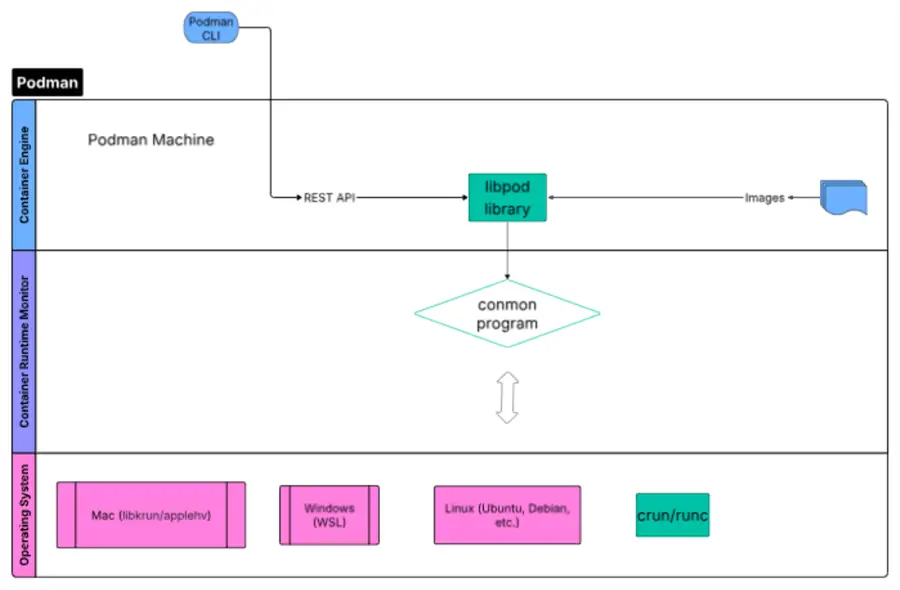
Essentially, Podman is lightweight in comparison to Docker.
Desktop
Both Docker and Podman provide a Desktop.
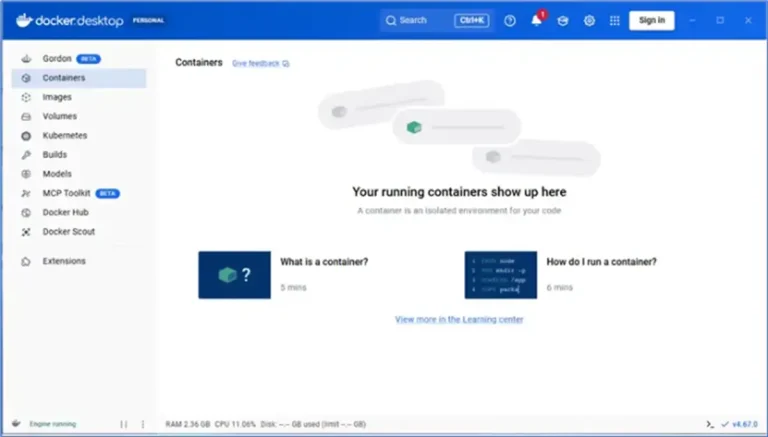
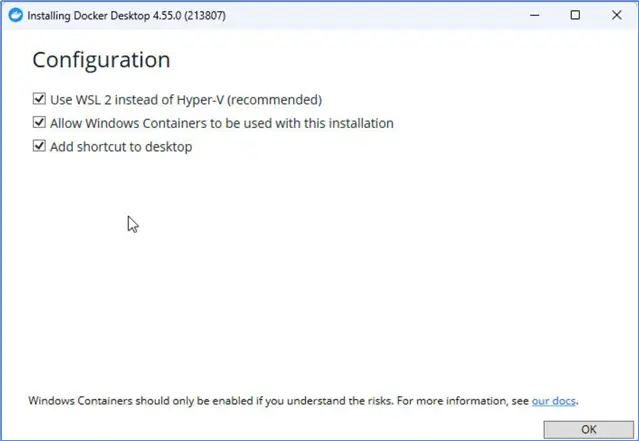
Docker Desktop and Podman Desktop are a Graphical User Interface that can be used on Linux, Windows, and macOS. On Windows and macOS, it requires virtualization support both in the hardware and at the operating system level. The hardware must have support for virtualization via a Hypervisor. On Windows, a software-level WSL 2 (Windows Subsystem for Linux) runs atop Hyper-V to provide a containerization provider.
Hyper-V is Microsoft’s native hypervisor that is needed to create and run virtual machines (VMs) on a Windows computer. We should verify that it is available in System Information.
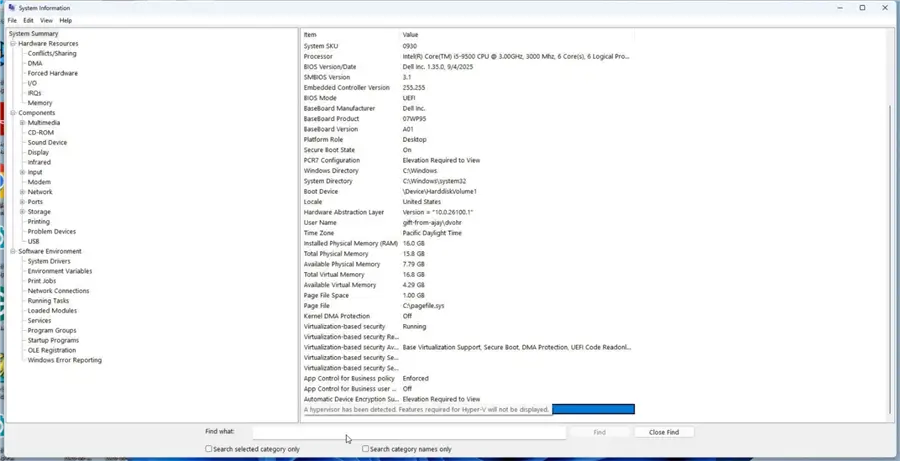
Alternatively, we can run the systeminfo command in PowerShell.
--MSSQLTips.com (PowerShell)

PS C:\Windows\system32> systeminfo

OS Name:                       Microsoft Windows 11 Pro
OS Version:                    10.0.26200 N/A Build 26200
OS Manufacturer:               Microsoft Corporation
…
Hyper-V Requirements:          A hypervisor has been detected. Features required for Hyper-V will not be displayed.
Similarly, Apple supports a Hypervisor in macOS, and we use a containerization provider type (libkrun, or applehv) at the software level to run containers.
When we install Docker Desktop on Windows (10/11), it prompts the user to choose WSL 2 as the provider type.
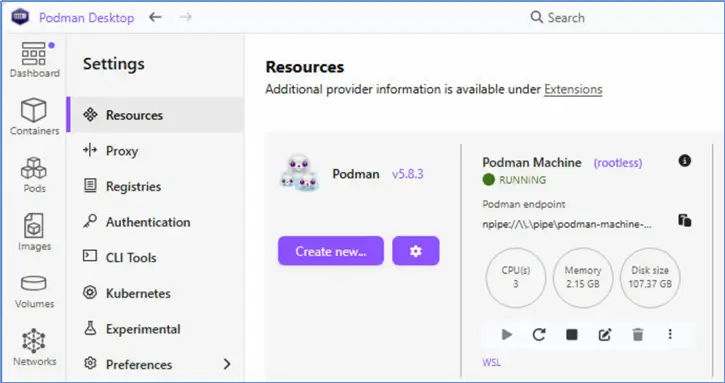
Similarly, Podman Desktop recommends WSL as the provider type, as noted by WSL under the default Podman machine.
Resource Utilization
To demonstrate that Podman uses fewer resources (processes, CPU, RAM), let’s find the process tree under similar workloads for Podman and Docker. Let us run a Docker container and a Podman container for SQL Server 2025. These should already be running if you run the earlier commands. However, note to delete all other containers except these two so that we can compare their resource usage.
--MSSQLTips.com (Bash)
podman ps
CONTAINER ID  IMAGE                                       COMMAND               CREATED      STATUS      PORTS                   NAMES
069e88cfcc71  mcr.microsoft.com/mssql/server:2025-latest  /opt/mssql/bin/sq...  3 hours ago  Up 3 hours  0.0.0.0:1433->1433/tcp  sql2025
docker ps
CONTAINER ID   IMAGE                                        COMMAND                  CREATED       STATUS       PORTS                                         NAMES
a82cf19ae1c7   mcr.microsoft.com/mssql/server:2025-latest   "/opt/mssql/bin/laun…"   3 hours ago   Up 3 hours   0.0.0.0:1434->1433/tcp, [::]:1434->1433/tcp   sqlserver2025
We have one Podman container running for SQL Server 2025 and one Docker container. Let us find the process tree for Podman, including the only background process, called conmon.
--MSSQLTips.com (Bash)
 pstree -ap $(pgrep -f "podman run" || pgrep -f "conmon")
conmon,9500 --api-version 1 -c 069e88cfcc71c5dc7021427d12bb891cea272fdcdf25b0cb310523c1a4067da3 -u 069e88cfcc71c5dc7021427d12bb891cea272fdcdf25b0cb310523c1a4067da3 -r /usr/bin/crun -b/home/ubuntu/.local/sha
  └─launch_sqlservr,9502 /opt/mssql/bin/launch_sqlservr.sh /opt/mssql/bin/sqlservr
      └─sqlservr,9506
          ├─sqlservr,9512
          │   ├─{sqlservr},9515
          │   ├─{sqlservr},9516
          │   ├─{sqlservr},9517
          │   ├─{sqlservr},9518
          │   ├─{sqlservr},9519
          │   ├─{sqlservr},9520
          │   ├─{sqlservr},9521
          │   ├─{sqlservr},9522
          │   ├─{sqlservr},9523
          │   ├─{sqlservr},9524
          │   ├─{sqlservr},9525
          │   ├─{sqlservr},9526
          │   ├─{sqlservr},9527
          │   ├─{sqlservr},9528
          │   ├─{sqlservr},9529
          │   ├─{sqlservr},9530
          │   ├─{sqlservr},9531
          │   ├─{sqlservr},9532
          │   ├─{sqlservr},9533
          │   ├─{sqlservr},9534
          │   ├─{sqlservr},9535
          │   ├─{sqlservr},9536
          │   ├─{sqlservr},9537
          │   ├─{sqlservr},9538
          │   ├─{sqlservr},9539
          │   ├─{sqlservr},9540
          │   ├─{sqlservr},9542
          │   ├─{sqlservr},9545
          │   ├─{sqlservr},9546
          │   ├─{sqlservr},9547
          │   ├─{sqlservr},9548
          │   ├─{sqlservr},9549
          │   ├─{sqlservr},9550
          │   ├─{sqlservr},9551
          │   ├─{sqlservr},9552
          │   ├─{sqlservr},9553
          │   ├─{sqlservr},9554
          │   ├─{sqlservr},9555
          │   ├─{sqlservr},9556
          │   ├─{sqlservr},9557
          │   ├─{sqlservr},9558
          │   ├─{sqlservr},9559
          │   ├─{sqlservr},9560
          │   ├─{sqlservr},9561
          │   ├─{sqlservr},9562
          │   ├─{sqlservr},9563
          │   ├─{sqlservr},9564
          │   ├─{sqlservr},9565
          │   ├─{sqlservr},9566
          │   ├─{sqlservr},9567
          │   ├─{sqlservr},9568
          │   ├─{sqlservr},9569
          │   ├─{sqlservr},9570
          │   ├─{sqlservr},9571
          │   ├─{sqlservr},9572
          │   ├─{sqlservr},9573
          │   ├─{sqlservr},9574
          │   ├─{sqlservr},9575
          │   ├─{sqlservr},9576
          │   ├─{sqlservr},9577
          │   ├─{sqlservr},9578
          │   ├─{sqlservr},9579
          │   ├─{sqlservr},9580
          │   ├─{sqlservr},9583
          │   ├─{sqlservr},9584
          │   ├─{sqlservr},9585
          │   ├─{sqlservr},9586
          │   ├─{sqlservr},9590
          │   ├─{sqlservr},9593
          │   ├─{sqlservr},9594
          │   ├─{sqlservr},9595
          │   ├─{sqlservr},9596
          │   ├─{sqlservr},9597
          │   ├─{sqlservr},9598
          │   ├─{sqlservr},9601
          │   ├─{sqlservr},9602
          │   ├─{sqlservr},9605
          │   └─{sqlservr},9628
          ├─{sqlservr},9513
          └─{sqlservr},9514
The output lists only one thread for the conmon program that monitors the container runtime. Podman’s container monitor (conmon) is running as Process ID 9500. The └─launch_sqlservr,9502 /opt/mssql/bin/launch_sqlservr.sh /opt/mssql/bin/sqlservr is for the SQL Server initialization script that runs inside the container. There is only one process for the SQL Server database engine, sqlservr,9506. The other {sqlservr},9515… are all worker threads.
Let us find the resource (CPU/RAM) consumption of conmon.
--MSSQLTips.com (Bash)
 ps -To pid,ppid,tid,%cpu,%mem,rss,comm -p $(pgrep -f "conmon")
    PID    PPID     TID %CPU %MEM   RSS COMMAND
   9500       1    9500  0.0  0.0  2480 conmon
Note that conmon is consuming 0% RAM, and 0% CPU.
Next, let us determine the process tree for the Docker-related processes (dockerd, containerd, and containerd-shim). A containerd-shim is a low-overhead process between containerd and the actual SQL Server application. The container-shim is running as long as SQL Server container is running.
First, let us list the process tree for containerd-shim.
--MSSQLTips.com (Bash)
 pstree -ap $(pgrep -f "containerd-shim")
containerd-shim,10861 -namespace moby -id a82cf19ae1c770455bf4a7f9ab88cc116dbb3ba841202c0aca740ec358d7b9d0 -address /run/containerd/containerd.sock
  ├─launch_sqlservr,10887 /opt/mssql/bin/launch_sqlservr.sh /opt/mssql/bin/sqlservr
  │   └─sqlservr,10956
  │       ├─sqlservr,10962
  │       │   ├─{sqlservr},10965
  │       │   ├─{sqlservr},10966
  │       │   ├─{sqlservr},10967
  │       │   ├─{sqlservr},10968
  │       │   ├─{sqlservr},10969
  │       │   ├─{sqlservr},10970
  │       │   ├─{sqlservr},10971
  │       │   ├─{sqlservr},10972
  │       │   ├─{sqlservr},10973
  │       │   ├─{sqlservr},10974
  │       │   ├─{sqlservr},10975
  │       │   ├─{sqlservr},10976
  │       │   ├─{sqlservr},10977
  │       │   ├─{sqlservr},10978
  │       │   ├─{sqlservr},10979
  │       │   ├─{sqlservr},10980
  │       │   ├─{sqlservr},10981
  │       │   ├─{sqlservr},10982
  │       │   ├─{sqlservr},10983
  │       │   ├─{sqlservr},10984
  │       │   ├─{sqlservr},10985
  │       │   ├─{sqlservr},10986
  │       │   ├─{sqlservr},10987
  │       │   ├─{sqlservr},10990
  │       │   ├─{sqlservr},10991
  │       │   ├─{sqlservr},10992
  │       │   ├─{sqlservr},10994
  │       │   ├─{sqlservr},10995
  │       │   ├─{sqlservr},10996
  │       │   ├─{sqlservr},10997
  │       │   ├─{sqlservr},10998
  │       │   ├─{sqlservr},10999
  │       │   ├─{sqlservr},11000
  │       │   ├─{sqlservr},11001
  │       │   ├─{sqlservr},11002
  │       │   ├─{sqlservr},11003
  │       │   ├─{sqlservr},11004
  │       │   ├─{sqlservr},11005
  │       │   ├─{sqlservr},11006
  │       │   ├─{sqlservr},11007
  │       │   ├─{sqlservr},11008
  │       │   ├─{sqlservr},11009
  │       │   ├─{sqlservr},11010
  │       │   ├─{sqlservr},11011
  │       │   ├─{sqlservr},11012
  │       │   ├─{sqlservr},11013
  │       │   ├─{sqlservr},11016
  │       │   ├─{sqlservr},11017
  │       │   ├─{sqlservr},11018
  │       │   ├─{sqlservr},11019
  │       │   ├─{sqlservr},11020
  │       │   ├─{sqlservr},11021
  │       │   ├─{sqlservr},11022
  │       │   ├─{sqlservr},11023
  │       │   ├─{sqlservr},11024
  │       │   ├─{sqlservr},11025
  │       │   ├─{sqlservr},11026
  │       │   ├─{sqlservr},11027
  │       │   ├─{sqlservr},11028
  │       │   ├─{sqlservr},11029
  │       │   ├─{sqlservr},11030
  │       │   ├─{sqlservr},11031
  │       │   ├─{sqlservr},11032
  │       │   ├─{sqlservr},11033
  │       │   ├─{sqlservr},11034
  │       │   ├─{sqlservr},11037
  │       │   ├─{sqlservr},11038
  │       │   ├─{sqlservr},11039
  │       │   ├─{sqlservr},11044
  │       │   ├─{sqlservr},11045
  │       │   ├─{sqlservr},11046
  │       │   ├─{sqlservr},11047
  │       │   ├─{sqlservr},11048
  │       │   ├─{sqlservr},11049
  │       │   ├─{sqlservr},11050
  │       │   ├─{sqlservr},11070
  │       │   ├─{sqlservr},11075
  │       │   └─{sqlservr},11076
  │       ├─{sqlservr},10963
  │       └─{sqlservr},10964
  ├─{containerd-shim},10862
  ├─{containerd-shim},10863
  ├─{containerd-shim},10864
  ├─{containerd-shim},10865
  ├─{containerd-shim},10866
  ├─{containerd-shim},10867
  ├─{containerd-shim},10868
  ├─{containerd-shim},10869
  ├─{containerd-shim},10870
  └─{containerd-shim},11547
Next, let us find the process tree of containerd.
--MSSQLTips.com (Bash)
pstree -ap $(pidof containerd)
containerd,8243
  ├─{containerd},8244
  ├─{containerd},8245
  ├─{containerd},8246
  ├─{containerd},8247
  ├─{containerd},8248
  ├─{containerd},8249
  ├─{containerd},9093
  ├─{containerd},9094
Further, let us find the process tree of dockerd.
--MSSQLTips.com (Bash)
pstree -ap $(pidof dockerd)
dockerd,8432 -H fd:// --containerd=/run/containerd/containerd.sock
  ├─docker-proxy,10915 -proto tcp -host-ip 0.0.0.0 -host-port 1434 -container-ip 172.17.0.2 -container-port 1433 -use-listen-fd
  │   ├─{docker-proxy},10918
  │   ├─{docker-proxy},10919
  │   ├─{docker-proxy},10920
  │   ├─{docker-proxy},10921
  │   ├─{docker-proxy},10923
  │   ├─{docker-proxy},10924
  │   └─{docker-proxy},10925
  ├─docker-proxy,10922 -proto tcp -host-ip :: -host-port 1434 -container-ip 172.17.0.2 -container-port 1433 -use-listen-fd
  │   ├─{docker-proxy},10927
  │   ├─{docker-proxy},10928
  │   ├─{docker-proxy},10931
  │   ├─{docker-proxy},10932
  │   ├─{docker-proxy},10942
  │   └─{docker-proxy},10943
  ├─{dockerd},8433
  ├─{dockerd},8434
  ├─{dockerd},8435
  ├─{dockerd},8436
  ├─{dockerd},8437
  ├─{dockerd},8438
  ├─{dockerd},8439
  ├─{dockerd},8452
  ├─{dockerd},8453
  ├─{dockerd},9102
  ├─{dockerd},12832
  └─{dockerd},14155
The Docker-related processes (dockerd, containerd, and containerd-shim) are running numerous threads each. Let us find their combined RAM resource consumption.
--MSSQLTips.com (Bash)
ps -eo rss,comm | grep -E "dockerd|containerd" | awk '{sum+=$1} END {print "Total Management RAM:", sum/1024, "MB"}'
Total Management RAM: 152.492 MB
Further, let us list their CPU consumption.
--MSSQLTips.com (Bash)
ps -eo pcpu,comm | grep -E "dockerd|containerd" | awk '{sum+=$1} END {print "Total Management CPU:", sum, "%"}'
Total Management CPU: 0.2 %
Clearly, the background processes are consuming significant CPU/RAM as compared to 0% for Podman.
Note that the SQL Server process consumes almost identical resources (CPU and RAM) under Podman and Docker. First, let us find under Docker.
--MSSQLTips.com (Bash)
 ps -p 10962 -o %cpu,%mem,cmd
%CPU %MEM CMD
 1.0  9.8 /opt/mssql/bin/sqlservr
Then, let us find under Podman.
--MSSQLTips.com (Bash)
 ps -p 9512 -o %cpu,%mem,cmd
%CPU %MEM CMD
 1.2  9.7 /opt/mssql/bin/sqlservr
Cloud Support
AWS EKS (Elastic Kubernetes Service), Azure AKS (Azure Kubernetes Service), Google GKE (Google Kubernetes Engine), and AWS Fargate all use containerd as the container runtime, which is the one used by Docker. Only Red Hat OpenShift on Cloud uses CRI-O, which is based on an architecture similar to Podman. Note that both CRI-O and Podman were developed by Red Hat. CRI-O is presently with CNCF. Note that none of the aforementioned cloud services use the dockerd background service. Only the AWS ECS (EC2 Launch Type) uses the dockerd daemon, which gives a user native control of the /var/run/docker.sock, the access point and control panel for the Docker engine on a Linux host.
Use Cases
Production SQL Server instances typically run on a multi-node Kubernetes cluster in the cloud. The containerd does consume more resources (CPU/RAM); however, it is the container runtime used by most Kubernetes cloud services. In a centralized, multi-node, SQL Server installation, there are advantages to having a persistent manager like containerd to monitor, restart, etc., the database. As containerd is more prevalent in the containerization industry, more companies use the Docker/containerd model.
Podman is used when security is the main driving objective. This is due to Podman’s daemonless, rootless containers. Second, Podman is preferred in lightweight environments like edge clusters, High-Performance Computing (HPC), and Internet of Things (IoT) applications. Leading companies like Boeing, IBM, Accenture, Nvidia, and Ford Motor Company use Podman.
Integration with Automation Pipelines (CI/CD)
Both Docker and Podman containers can be integrated into CI/CD engines like GitHub Actions & GitLab CI. CRI-O, a lightweight Container Runtime Interface (CRI), offers advantages in automation (CI/CD) pipelines, especially with OpenShift Pipelines. However, cloud service-based CI/CD pipelines mostly use the containerd model.
Support for Kubernetes/Orchestration
Cloud-based Kubernetes services run mostly on the containerd runtime, except OpenShift, which runs on the CRI-O runtime. However, Podman supports a unique service called kube play. Kubernetes typically requires extensive setup, consumes significant resources (CPU, RAM), and takes some time for orchestration. Podman’s kube play is a manifest interpreter that can play Kubernetes YAML files without actually using Kubernetes. Its advantages are speed, minimal resource overhead, and minimal configuration. Kubernetes can’t directly orchestrate Podman containers. However, the Podman containers can be exported to Kubernetes YAML manifests that can be run with kubectl.
Only Docker supports the Docker Swarm orchestration tool.
Support for Docker Compose
Both Podman and Docker support Docker Compose, a tool for defining and running multi-container applications.
Summary
In this article, we compare two container engines: Podman vs Docker. We compare them across different factors. There is no single container engine that is best for everyone. We discuss how Podman is similar to and different from Docker. Furthermore, we cite their salient use cases.
Next Steps
- Read up on related articles and documentation:
- Connect to and Monitor SQL Server Azure Container Instances ACI
- Resource Management for Pods and Containers
- Run SQL Server on Kubernetes
- How to Run SQL Server on Amazon Elastic Kubernetes Service
- How to Deploy SQL Server on Kubernetes running on Windows
- How to run SQL Server on Amazon Elastic Container Service
- Setup SQL Server and Docker on a MacBook
- Create SQL Server on Windows Docker Container
- Docker Commands with Examples for SQL Server DBAs
- Docker Container Names, Internals and Storage for SQL Server

Deepak Vohra is an Oracle Certified Data Science Professional, and an author of more than 20 books. Hobbies include philately, golf, and cricket.