Problem
It is very usual to have a set of discrete data points but sometimes it is necessary to estimate values between those points. Is it possible to create a function to do this in SQL Server?
Solution
Among other methods, the Lagrange interpolation is a numerical method used to find a polynomial that passes exactly through a given set of points. It is commonly used in engineering, data interpolation, signal processing, image resampling, numerical solutions of differential equations, control system, robotics, trajectory planning in computer graphics and animation, etc.
It is indicative for a relatively small number of points once higher degree polynomials have a problem of oscillation at the edges of an interval.
Lagrange Interpolation Table Value Function
I created a user defined table type to work with the x and y data.
CREATE TYPE [dbo].[uttTwoVar] AS TABLE(
   [n] [int] IDENTITY(1,1) NOT NULL,
   [x] [decimal](18, 6) NULL,
   [y] [decimal](18, 6) NULL
)
In addition, I created a Lagrange function that uses the data type above to enter the table of x and y values, the number of interpolated items that I want to retrieve OR the increment steps between the minimum and maximum x.
-- =============================================
-- Author:      SCP - MSSQLTips
-- Create date: 20241104
-- Description: Lagrange Interpolation
-- =============================================
CREATE FUNCTION [dbo].[tvfLagrangeInterpolation]
         (@Data dbo.uttTwoVar READONLY
         ,@Itens int
         ,@Delta decimal(18,6))
RETURNS  @DataRes TABLE
         ([n] int
         ,[x] decimal(18, 6)
         ,[y] decimal(18, 6))
WITH EXECUTE AS CALLER
AS
BEGIN

   DECLARE  @n  decimal(18,6)
         ,@nMax decimal(18,6) = (SELECT MAX(n) FROM @Data)
         ,@vh   decimal(18,8)
         ,@pod  decimal(18,8)
         ,@pol  decimal(18,8)
         ,@p    decimal(18,6)
         ,@xMin decimal(18,6) = (SELECT MIN(x) FROM @Data);

   IF @Itens > 0
      BEGIN
         SET @n = @Itens - 1;
         SET @vh  = ((SELECT MAX(x) FROM @Data) - @xMin) / @n;
      END
   ELSE
      BEGIN
         SET @vh = @Delta;
         SET @n  = ((SELECT MAX(x) FROM @Data) - @xMin) / @vh;
      END

   DECLARE  @L int = 1
         ,@vi int
         ,@vk int
         ,@xi decimal(18,6)
         ,@xk decimal(18,6);

   WHILE @L <= @n + 1
      BEGIN
         SET @p = @xMin + @vh * (@L -1);
         SET @pol = 0;
         SET @vk = 1
         WHILE @vk <= @nMax
            BEGIN
               SET @xk = (SELECT x FROM @Data WHERE n = @vk);
               SET @pod = 1;
               SET @vi = 1
               WHILE @vi <= @nMax
                  BEGIN
                     SET @xi = (SELECT x FROM @Data WHERE n = @vi)

                     IF @vi <> @vk
                        SET @pod *= (@p - @xi) / (@xk - @xi)

                     SET @vi += 1;
                  END
               SET @pol += (SELECT y FROM @Data WHERE n = @vk) * @pod

               SET @vk += 1;
            END

         INSERT INTO @DataRes
            SELECT @L
                  ,@p
                  ,@pol;

            SET @L += 1;
      END

   RETURN;
END
Executing the Lagrange Interpolation Function
So, we can now run the example code below to use the function.
DECLARE @Data [dbo].[uttTwoVar];

INSERT INTO @Data
   VALUES ( 1,  1)
      ,( 3,  9)
      ,( 5,  25)
      ,(10, 100);

SELECT * FROM [dbo].[tvfLagrangeInterpolation] (@Data,0,1);
The data followed the equation y = x2 to easily verify the interpolated values with an increment step of 1, resulting in:
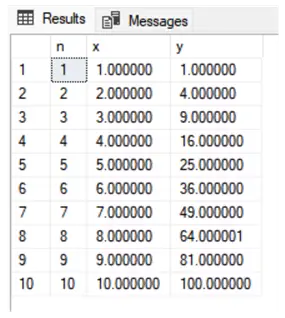
Lagrange Interpolation Example
In addition, I decided to enter a number and its logarithmic value.
DECLARE @Data [dbo].[uttTwoVar];

INSERT INTO @Data
   VALUES (1.00,LOG(1))
      ,(1.25,LOG(1.25))
      ,(1.50,LOG(1.5))
      ,(1.75,LOG(1.75))
      ,(2.00,LOG(2))
      ,(2.25,LOG(2.25))
      ,(2.50,LOG(2.5))
      ,(2.75,LOG(2.75))
      ,(3.00,LOG(3));

SELECT *, FORMAT(EXP(y),'0.0000') AS ExpChk FROM [dbo].[tvfLagrangeInterpolation] (@Data,0,0.125);
We can now see that executing the code we have the values of y and the EXP(y) check column:

There is no need to know the previous equation behind the data, and I only did this to better illustrate that the interpolated values follow the rule. The precision will depend on the number of points entered.
Next Steps
- Check out these additional resources:

Sebastião Pereira has over 40 years of experience in database development including T-SQL, algorithm design, machine learning and bringing innovative mathematical formulas to SQL Server. He started his career at a transnational fast-moving consumer goods (FMCG) company as an employee then later transitioning into a consultant role. He eventually founded his own company to develop software solutions for the healthcare industry. Sebastião is a respected award-winning author on MSSQLTips.com extending SQL Server capabilities beyond traditional workloads.
- MSSQLTips Awards
- Author of the Year – 2025
- Trendsetter (25+ tips) – 2025
- Rookie of the Year – 2024

