Problem
Many SQL developers encounter challenges when efficiently searching for data within a specific date range. This is especially difficult when dealing with large, partitioned or sharded tables. In this SQL tutorial, we look at different ways to write SQL to return data between date ranges. We will also see how to improve performance when data is partitioned.
Solution
When working with databases, it is common to search for data within a specific date range. Fortunately, Microsoft SQL Server provides several methods for performing these types of searches with T-SQL. This SQL tutorial illustrates some of the most common techniques for searching between two date values in SQL. This includes using the BETWEEN operator, the greater than (>) and less than (<) operators, and the DATEPART() function. It also provides some tips for efficiently searching between dates on partitioned and sharded tables, which can help improve performance.
Searching Between Dates Using SQL Arithmetic Operators
One method for searching between two dates is to use arithmetic operators (greater than and less than operators). These operators allow specifying the start and end dates of the desired date range. For instance, the following SQL command can be used to retrieve records between 2009-01-01 and 2009-12-31.
Note that the CreationDate column also includes time, so the below query will only get data until 2009-12-31 at midnight. The rest of the data for that last day will not be included.
SELECT *
FROM [StackOverflow2010].[dbo].[Posts]
WHERE CreationDate >= '2009-01-01' AND CreationDate <= '2009-12-31';
Searching Between Dates Using the SQL BETWEEN Operator
Another method for searching between two date values in SQL is to use the BETWEEN operator. The BETWEEN operator filters results within a specified range, including the start and end values. For instance, the following query can be used to find all records between 2009-01-01 and 2009-12-31.
Note that the CreationDate column also includes time, so the below query will only get data until 2009-12-31 at midnight. The rest of the data for that last day will not be included.
SELECT *
FROM [StackOverflow2010].[dbo].[Posts]
WHERE CreationDate BETWEEN '2009-01-01' AND '2009-12-31';
Searching Between Dates Using Date Functions
There are other methods to search between two date values in SQL. One method involves using the DATEPART function to extract specific date parts such as year, month, or day from a date column. For example, the following query is used to find all records where the year in the DateColumn column is 2009:
SELECT *
FROM [StackOverflow2010].[dbo].[Posts]
WHERE DATEPART(year, CreationDate) = 2009;
Similarly, you can use DATEPART to extract and compare other date parts, such as month or day. While this method can be less intuitive than arithmetic operators or the BETWEEN operator, it can be useful in certain scenarios, especially when extracting and comparing specific date parts.
Comparison of Arithmetic Operators vs. BETWEEN vs. Date Functions
In the screenshot below, we can note that the three methods provided return the same record count. To make sure all data for the entire year is selected, we changed the queries a bit as shown below to make sure we include the entirety of the last day of the year.
Note: in the first query statement below, if any CreationDate happens to be exactly 2010-01-01 at midnight, these would be included in the counts. So it is important to understand the data you are working with.

Also, the estimated execution plans are very similar; they all use the index on the CreationDate column:

Note that the date function DATEPART performs an Index Scan operation, while the other two methods perform an Index Seek. This is because, in SQL Server, when functions are used (DATEPART in this case) all data needs to be evaluated for the condition and this does not provide the benefit of using the created indexes.
Searching Between Dates for Large Partitioned Tables
When searching between two date values on a table partitioned using a date value, it is critical to leverage the partitioning scheme. This will minimize the amount of data to be scanned. One way to do this is to use a specific partition by eliminating unnecessary partitions, which involves identifying and scanning only the partitions that contain data within the desired date range. This can result in significant performance gains, especially for large tables.
Date Example
To perform partition elimination, you can include the partitioning column and the search criteria in the WHERE clause.
For example, suppose you have a table partitioned by date on the CreationDate column. You want to find all records between 2009-01-01 and 2009-12-31. You could use a query like this:
SELECT *
FROM [StackOverflow2010].[dbo].[Posts]
WHERE CreationDate >= '2009-01-01' AND CreationDate <= '2009-12-31';
Date and Time Example
Let’s look at a more realistic example. I have been working with a huge partitioned table for years. Most of the time, the date columns are unused as a partition key and instead a date part is used.
For example, while a transaction date/time column could exist in the table, the day of the year (1 to 365) column is used as the partition key. In that case, using the query below to search over the date column may decrease performance, especially when the data size is vast and we do not have the option of creating every needed index.
In this example, we are looking at data between a certain date and time.
SELECT * FROM [StackOverflow2010].[dbo].[Posts]
WHERE CreationDate >= '2009-01-01 05:00:00' AND CreationDate <= '2009-01-05 09:00:00'
Partitioned Table Example
SQL Server provides several ways to control which partitions are searched based on data values. Below, the CreationDayofYear column is the partition key and these values are 1-365 for each day of the year. We are selecting data from partitions 1,2,3,4, and 5 for the first 5 days of the year and also limiting data for the 1st day and the 5th day.
SELECT *
FROM [StackOverflow2010].[dbo].[Posts]
WHERE CreationDate >= '2009-01-01 05:00:00'
  AND $PARTITION.pfDayOfTheYear(CreationDayofYear) IN (1);

UNION ALL

SELECT *
FROM [StackOverflow2010].[dbo].[Posts]
WHERE $PARTITION.pfDayOfTheYear(CreationDayofYear) IN (2,3,4);

UNION ALL

SELECT *
FROM [StackOverflow2010].[dbo].[Posts]
WHERE CreationDate <= '2009-01-05 09:00:00'
  AND $PARTITION.pfDayOfTheYear(CreationDayofYear) IN (5);
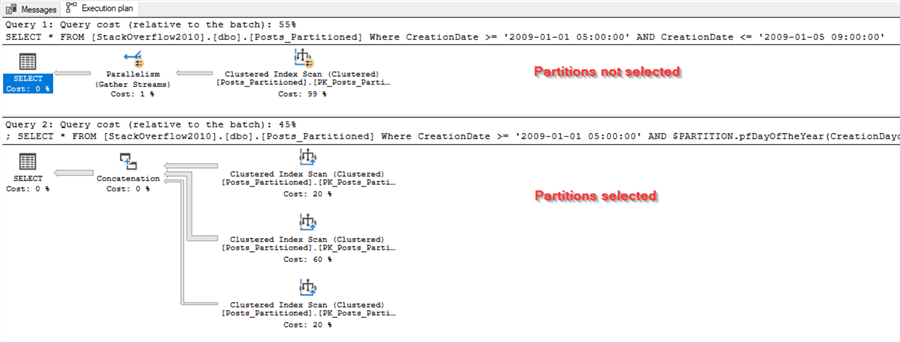
In this example, $PARTITION.pfDayOfTheYear returns the partition number based on the value of the CreationDayofYear column. The IN operator specifies the partitions that should be searched. By specifying the partitions to be searched, you can ensure that only the relevant partitions are scanned rather than scanning the entire table. Besides, by using the syntax above, we help the query optimizer ignore the CreationDate column value when we are sure that the whole partition is within the date range specified. Note: on the boundaries partitions (1 and 5), we add the needed filter to include time on the CreationDate column, but this is not needed in the middle for (2,3,4).
Performance Considerations
On the other hand, if we execute the following SQL query:
SELECT *
FROM [StackOverflow2010].[dbo].[Posts]
WHERE CreationDate >= '2009-01-01 05:00:00' AND CreationDate <= '2009-01-05 09:00:00'
  AND $PARTITION.pfDayOfTheYear(CreationDayofYear) IN (1,2,3,4,5);
The query optimizer will be unaware of the following facts:
- In partition 1, the CreationDate <= ‘2009-01-05 09:00:00’ filter is meaningless.
- In partition 5, the CreationDate >= ‘2009-01-01 05:00:00’ filter is meaningless.
- In partitions 2, 3 and 4, filtering on the CreationDate column is meaningless.
This approach must increase the performance when working with huge partitioned tables where we do not have the option to create every needed non-clustered index. Note that splitting the query may decrease the performance on small or medium tables (up to a few gigabytes). Also, the performance gain also depends on how partitions are distributed over the data storage.
Searching Between Dates in Sharded Tables
When searching between two date values on a sharded database, it is essential to consider the shard key and how queries are built using a routing table. If the shard key is the day or month value, then queries that span multiple shards can be prolonged and resource-intensive. One way to mitigate this issue is to use a routing table, which maps queries to the appropriate shard based on the queried date range. The routing table should be optimized to minimize the number of shards that need to be queried while ensuring that all relevant data is retrieved.
To further optimize searching between two date values on a sharded database, it is essential to ensure that indexes are appropriately set up. In particular, indexes should be partitioned to align with the shard key so that queries routed to a single shard can be executed efficiently. Additionally, query optimization techniques such as parallelism and caching can be used to improve performance further.
Conclusion
In conclusion, searching between two date values in SQL can be performed using various methods, such as arithmetic operators, the BETWEEN operator, and the DATEPART function. To ensure that only relevant data is queried when dealing with partitioned and sharded tables, pruning techniques, such as routing tables and shard filters, should be used to optimize queries. Additionally, it is essential to properly set up indexes and partitions to align with the shard key and optimize query performance. By implementing these techniques, developers can efficiently search between two date values on SQL databases and effectively manage large amounts of data.
Frequently Asked Questions
This usually happens when the column stores both date and time. If the filter ends at midnight, then the rest of that day is not included. I would always check whether the column is a date only column or a date and time column before writing the filter. This tip is useful for reviewing the different date types: Learn about SQL Date Data Types.
Not always. BETWEEN is easy to read, but you need to be careful when the column includes time. I usually prefer a start date with >= and an end boundary with < when working with datetime values. It makes the ending point clearer and avoids missing rows from the last day.
Yes, if the column includes time and the time matters for the result. If you only compare the date part you may return too much data or miss some rows. It depends on what the report or query really needs.
I would avoid converting the date column in the WHERE clause unless you really need to. It can make the query harder for SQL Server to optimize. If the column has an index, then filtering the original column is usually better. Use conversion more for display than for searching.
Then you need to be more careful. A filter on the date column alone may not be enough if the time range also matters. You may need to combine the logic so the first day and last day are handled correctly. I would test the result with a small range first.
DATEADD is useful when the end date is based on the start date or when you need a rolling date range. It also helps when building the next day or next month boundary. For the basics see SQL DATEADD Function Use and Examples.
DATEDIFF is used when you need the difference between two date values. I would use it for calculations and checks. I would be more careful using it directly on a table column in a WHERE clause because it can affect performance. This tutorial covers the basics: SQL DATEDIFF Function Use and Examples.
Yes. Date range filters can benefit a lot from the right index. This becomes more important as the table grows. If a query is slow then check the execution plan and see whether SQL Server is using a seek or scanning too much data. A good place to start is SQL Server Execution Plan Overview.
Partitioning is worth looking at when the table is large and most queries search by a date range. It can help SQL Server focus on the needed part of the data. It is not something I would add for every table. Start with the query pattern and the table size. For more details see Creating a table with horizontal partitioning in SQL Server.
Yes, if the data comes from different systems or different locations. A date range that looks correct in one time zone may not return the same business period in another. I would confirm how the dates are stored before writing the filter.
Check the date column data type first. Then check whether the column stores time. After that test the start and end boundaries with a small result set. Date filters look simple but small mistakes can change the numbers in a report.
I would use a clear format that SQL Server can read the same way every time. Avoid formats that can be confused between day and month. The yyyy-mm-dd style is usually easier to read and safer to work with. For more date formatting options see SQL Date Format Examples using CONVERT Function.
Start by getting today’s date then build a range around it. Do not compare only formatted text unless you are doing this for display. For more options see SQL Current Date: Understanding Your Options.
Next Steps
- You can learn more about partitioned tables in SQL Server in the following tips:
- You can learn more about database sharding in the following article:
- You can learn more about data types and date functions in the following tips:

Hadi Fadlallah is an SQL Server professional with more than 10 years of experience. His main expertise is in data integration. He’s one of Stackoverflow.com’s top ETL and SQL Server Integration Services contributors. Also, he is a university lecturer and writes scientific and technical articles on several blogs. On the academic level, he holds a Ph.D. degree in data science focusing on context-aware big data quality and two master’s degrees in computer science and business computing.
- MSSQLTips Awards: Trendsetter (25+ tips) – 2025 | Author of the Year Contender – 2023 | Rookie of the Year – 2022


Can I select records between outdat(2023-12-28), outtime(7:00:00) and outdate(2023-12-29), outtime(7:00:00)
@Tim it is better to avoid functions since it will not benefit from index seek. You can add the time part to your query as follows: where [datetimecolumn] between ‘2023-01-01 00:00:00’ and ‘2023-01-06 23:59:59’
I have been using the following for years. Is this good practice? WHERE CAST(<date field> AS Date) BETWEEN 1/1/2023 and 6/1/2023.
This removes the time component from the field being searched, and always gives me what I need.