Problem
SQL Server professionals must be familiar with traditional on-premises and cloud deployment options, such as Azure-based deployments. They should also be aware of the differences between deployment, configuration, monitoring, high availability, and disaster recovery solutions for SQL Server.
This tip will discuss an overview of Azure for the SQL Server Professional and things you should know about Azure.
Solution
Cloud solutions are broadly classified into three categories:
- Software-as-a-Service (SaaS)
- Platform-as-a-Service (PaaS)
- Infrastructure-as-a-Service (IaaS)
The following diagram shows the shared responsibility model in Azure and highlights the difference between SaaS, PaaS, and IaaS.
- SaaS: The cloud provider handles most of the responsibilities, and the customer is responsible for the data.
- PaaS: The cloud provider is responsible for physical infrastructure, operating systems, development tools, and databases.
- IaaS: Responsibility lies with the customer, except for handling the physical hosts, network, and data center.
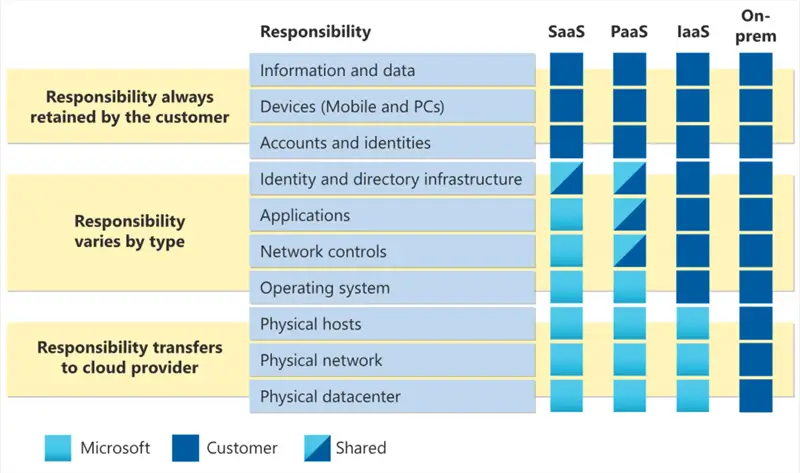
image reference: Microsoft docs
Microsoft provides the offerings below for SQL Server in the Azure cloud based on the cloud deployment options:
- Azure SQL Database
- Azure SQL Managed Instance
- SQL Server on Azure Virtual Machine
Let’s learn about these SQL database offerings and understand their differences.
Azure SQL Database
These are some of the main attributes.
- It is a PaaS deployment option in Azure with an OS and SQL Server instance abstraction.
- Users can create a SQL database and start using it for their development work.
Reference articles:
A few key features of Azure SQL Database:
- Single database
- Elastic pool
- Hyperscale storage (100TB+)
- Serverless compute
- Fully managed Service
- Private link support
- High availability with Az isolation
Serverless Compute
The serverless computing tier offers the database with intermittent and unpredictable usage and price and performance tradeoffs. It allows features such as auto-scaling, Automatic Pausing and Resume, and billing per second. It is ideal for Development and testing environments and Applications with frequently changing workloads that do not require fixed compute availability.
Refer to the article Going Serverless with Azure SQL Database for more details on Serverless computing in addition to these articles:
Databases
Single Database:
- Hyperscale storage (up to 100 TB)
- Fully Managed service
Elastic Pool:
- Resource sharing between multiple databases to optimize price.
- Simplified Performance management for multiple databases.
- Fully Managed Service.
Purchase Model
Azure SQL Database offers purchases based on database transaction units (DTU-based) or virtual cores (vCore-based).
- DTU: It provides a bundled measure of compute, storage, and I/O resources.
- vCore-based: You can independently select compute and storage resources. This model also allows using Azure Hybrid benefit for SQL Server or pay in advance (reserved capacity) for cost savings.
Service Tiers
The vCore model supports three service tiers:
| General Purpose | Business Critical | Hyperscale |
|---|---|---|
| Scalable compute and storage | Highest resilience to failures | Suitable for large environments (100 TB+ storage) |
| Suitable for most of the workload | Suitable for applications having low latency requirements | Available only in a single database. |
| Budget oriented | Supports in-memory OLTP for higher performance | It lies between the general purpose and critical business service tiers. |
Reference articles:
- Migrate Azure SQL DB from DTU to vCore Based Purchasing Model
- How to use the Azure SQL Database DTU Calculator
- Choosing Between Azure General Purpose or Business Critical Tiers
- What’s in a DTU? Choosing the right resource model and service tier for Azure DB
- Business Critical Tier of Azure SQL Services
Security
The following table summarizes the Azure SQL Database security options for network security, identity and access, data protection, and security management.
Network Security
- Vnet, Firewall Rules, NSG, Private Link
Identity and Access
- Authentication options: Azure AD, SQL Auth, Windows Auth
- Azure RBAC
- Roles and permissions
- Row-level security
Data Protection
- Encryption-in-use (Always Encrypted)
- Encryption-at-rest (TDE)
- Encryption-in-flight (TLS)
- User-managed keys
- Dynamic data masking
Security Management
- Advanced threat detection
- SQL audit
- Audit integration with log analytics and event hubs
- Vulnerability assessment
- Data discovery and classification
- Azure Security Center
Reference articles:
- Adding Users to Azure SQL Databases
- Improve Security with an Azure Service Principal
- Configuring SQL Server Endpoint and ACL Access in Windows Azure
- Add and Monitor Transparent Data Encryption to Azure SQL Databases
- Azure SQL Database TDE Customer Managed Keys
High Availability
- Backup and Restore. Azure SQL Database is automatically backed up as the following schedule:
- Full database backup: Once a week
- Log backup: Every 5-10 minutes
- Differential backup: Every 12-24 hours
- Backup storage: In read-access geo-redundant storage (RA-GRS)
- Option to choose zone-redundant storage (ZRS) or locally redundant storage (LRS)
Geo-replication and Auto-failover Groups. The diagram below shows the features of Geo-replication and failover groups.

Reference articles:
- Enabling Active Geo-Replication For Azure SQL Database
- Add Azure SQL databases to existing auto-failover group
- Configure Active Geo-Replication for Azure SQL Database
- Remove Azure SQL Databases from a Failover Group and Remove Geo-Replication
- Change Primary Region for Azure SQL Database Failover Group
- Configure Auto-Failover Group for Azure SQL Database and Azure SQL Managed Instances for SQL Server
- Creating backups and copies of your SQL Azure databases
- SQL Azure Geo-Replication Configuration and Testing
- How Paychex Utilizes Microsoft’s Azure SQL Database For Handling Its Substantial Growth
Azure SQL Managed Instance
Azure SQL Managed Instance is also an Azure PaaS offering and works best for lift-and-shift migrations to the cloud. You get a SQL Server instance, but Azure removes the overhead of managing the underlying VM from the customer. The key features of the Azure SQL Managed instances are:
- Fully managed service
- Single interface for on-premises and cloud workloads
- SQL Server surface area support
- Native virtual network support
- Fully managed service
- Operational database enabled with Azure AD and RBAC controls
- End-to-end database migration with minimal code changes
- High availability with built-in failover groups
- Predictable costs with flexible compute, storage, and licensing options
- ideal for customers looking to use instance-scoped features
Deployment Options
Single Instance:
- SQL Server surface area (vast majority)
- Native virtual network support
- Fully managed service
Instance Pool:
- Pre-provision compute resources for migration
- Enable cost-efficient migration
- Ability to host smaller instances
- Fully Managed service
Purchasing Model
Azure SQL Managed Instance does not support the DTU model; only Virtual Core-based deployment is supported.
The link Azure SQL Managed Instance vs. Azure SQL Database gives a comparison between the Azure PaaS deployments.
Reference articles:
- Introduction to Azure SQL Database Managed Instances
- Deploy, and Configure Azure SQL Managed Instance
- Migrate to an Azure SQL Managed Instance
- Provision a Free Azure SQL Managed Instance Step by Step
- Get Azure SQL Managed Instance free for 12 months
- Azure Managed Instance Download and Restore SQL Server Backup
- Enable Auditing for Azure SQL Managed Instance
Case Study:
SQL Server on Azure VM
SQL Server Azure VM is an Infrastructure-as-a-Service (IaaS) that gives you full access to SQL Server features and instances similar to an on-premise SQL Server.
Key Features
- SQL Server IaaS with proven success
- Editions: Enterprise, Standard, Developer, Express
- Windows, Linux OS available
- High-volume, ETL and OLTP workloads supported
- SSAS, SSIS, and SSRS
- Automated backups and restores with Azure Blob Storage
- Built-in high-availability options
- Enhanced storage performance for premium disks
- Azure Hybrid Benefit reduces costs for moving on-premises workloads to Azure
Reference articles:
- Access SQL Server instance on Azure VM using a local copy of Management Studio
- How To Connect Remotely to SQL Server on an Azure Virtual Machine
- Building SQL Server Cluster on Azure with Storage Spaces Direct – Part 1
- Setup Microsoft SQL Server Failover Cluster Instance Behind an Azure Internal Load Balancer
- Migrate SQL Server database to Azure VM
- Using Azure SQL Data Sync to Replicate Data
- Azure VM Deployment Best Practices
Next Steps
- Explore Microsoft docs on Azure SQL Server deployment options, understand your requirements, and choose the appropriate deployment from Azure SQL Database, Azure SQL Managed Instance, or SQL Server on Azure VM.
- Use the appropriate tool, such as MySQL workbench Azure Database Studio, to connect to and query the MySQL database in Azure.
- You can review existing tips for Azure.

Hi! I am Rajendra Gupta, Database Specialist and Architect, helping organizations implement Microsoft SQL Server, Azure, Couchbase, AWS solutions fast and efficiently, fix related issues, and Performance Tuning with over 14 years of experience.
I am the author of the book “DP-300 Administering Relational Database on Microsoft Azure.” I can be reached at: Rajendra.gupta16@gmail.com for any consulting help.
- MSSQLTips Awards:
- Author of the Year – 2022 | Author Contender – 2021/2023/2024 | Champion Award (100+ tips) – 2020


Please update this great article to include Fabric in the comparison and include mirroring